Operate
Every route, driver, van and device on one grid.
The Daily Timesheet is where dispatch happens. Assign, publish, adjust and produce paperwork without leaving the page.
The problem
Dispatch runs on a spreadsheet no one trusts.
Copies get out of sync, a van swap means retyping three columns, and the DVIC pile grows while drivers wait at the door.
How FLO solves it
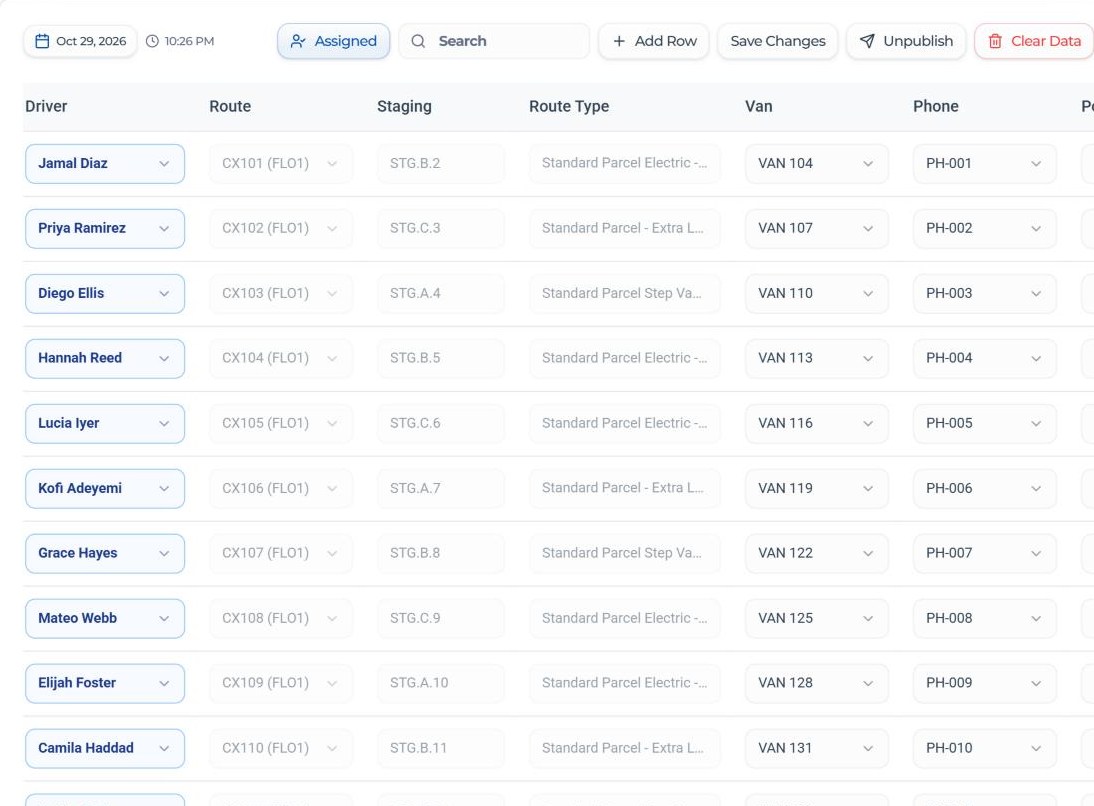
FLO's Daily Timesheet holds the day's assignments in one published grid, with transfers, extra rows and DVICs built in.
Inside Dispatch & Timesheet
What it does, in detail.
Routes from the morning report
The day's routes, staging spots and route types come straight in.
Add Row
An extra line for added work or rescues. It saves the moment you add it.
Save, publish, unpublish
Save Changes keeps your copy and publishes new rows that have a driver. Unpublish when you need to edit.
Transfers
Move a vehicle, phone or power bank to another driver on a published row.
Generate DVIC
Create the DVIC form from any row that has a driver and a van, with a review step first.
Find anything fast
Pick the date, filter to assigned rows and search by driver, route or van.
How it works
Four steps, every time.
Pick the date
Routes for that day load into the grid.
Assign
Choose the driver, van, phone, power bank and helper for each route.
Publish
Send every row that has a driver to the team.
Adjust
Transfer devices, add rows and generate DVICs as the morning moves.
The specifics
The details your team will ask about.
Columns on each row
- Bags
- Driver
- Route
- Staging
- Route type
- Van
- Phone
- Power bank
- Helper
- Other equipment
- Arrival
Good to know
- Clear Data clears only the unsaved copy in this browser
- Arrival times feed the Arrival Log
- The DVIC is pre-filled with your DSP code from Settings
Who it helps
Built for everyone at the station.
Dispatchers
One grid instead of five tabs and a phone.
Operations Managers
See exactly who has which van and device.
Fleet Managers
Van and device swaps recorded as they happen.
Drivers
The right van and devices, with paperwork ready.
Keep exploring
Related areas of FLO.
- No. FLO does not connect to telematics. The timesheet reflects what your team assigns.
- It fills in the DVIC form for a row's driver and van as a PDF you can print, after a short review of the details.
- Yes. Use the transfer option on a published row to move a vehicle, phone or power bank to another driver.
- Only the unsaved copy in your browser. Saved and published rows stay.
See Dispatch & Timesheet with your own station.
Book a walkthrough with our team, or start a 30-day free trial and set it up yourself.
30-day free trial · Independent software, not affiliated with Amazon