
Manage Your Assets
Know exactly which vans are ready to roll.
Fleet totals, a full vehicle list and a profile for every van, with your whole fleet imported from a spreadsheet.
The problem
"How many vans do we actually have?" shouldn't be a hard question.
Vans move between maintenance, rentals and the road. Without one list, no one knows what's ready until the morning launch.
How FLO solves it
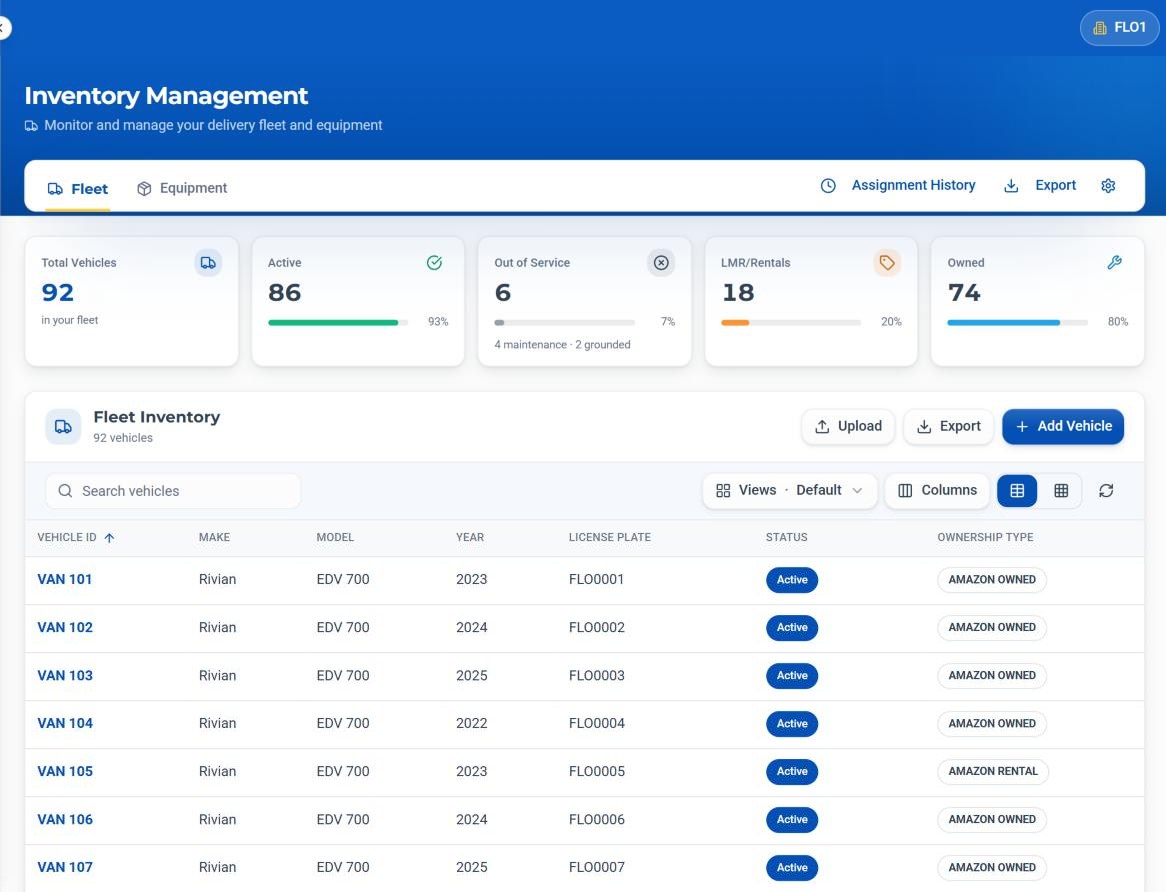
FLO keeps one fleet list with totals for active, out of service, rental and owned vans, and a profile for each one.
Inside Fleet & Vehicle Management
What it does, in detail.
Fleet totals
Total vehicles, active, out of service, LMR/rentals and owned, each with its share of the fleet.
Vehicle profile
Vehicle, registration, ownership, status, last service, assignment and notes.
Inspection photos
Time-stamped inspection photos on the vehicle profile.
Fleet upload
Upload an .xlsx or .csv, check the preview, then add the vehicles.
Assignment History
Who had which van, and when.
Export
Download the fleet list whenever you need it.
How it works
Four steps, every time.
Upload your fleet
Import from a spreadsheet, or add a vehicle by hand.
Keep status current
Mark vans active, in maintenance, grounded or in service.
Assign
Vans go out on the Daily Timesheet.
Review
Check assignment history and export the list.
The specifics
The details your team will ask about.
Out of Service includes
- Maintenance
- Grounded
- Service
On the list
- Vehicle ID, make, model, year
- License plate
- Status and ownership type
- Saved views and column choices
- Table or grid layout
Who it helps
Built for everyone at the station.
Fleet Managers
One trusted list of every van.
Dispatchers
Only road-ready vans on the timesheet.
Operations Managers
Out-of-service vans visible before launch.
DSP Owners
Owned versus rental at a glance.
Keep exploring
Related areas of FLO.
- No. Vehicle information is entered or imported by your team.
- Yes. Upload an .xlsx or .csv, check the preview, and confirm to add the vehicles.
- Yes. Vehicle codes only need to be unique within a station.
- From the driver app, with Report Vehicle Issue. Reports show up under Incidents.
See Fleet & Vehicle Management with your own station.
Book a walkthrough with our team, or start a 30-day free trial and set it up yourself.
30-day free trial · Independent software, not affiliated with Amazon