
Operate
A weekly schedule with the rules already built in.
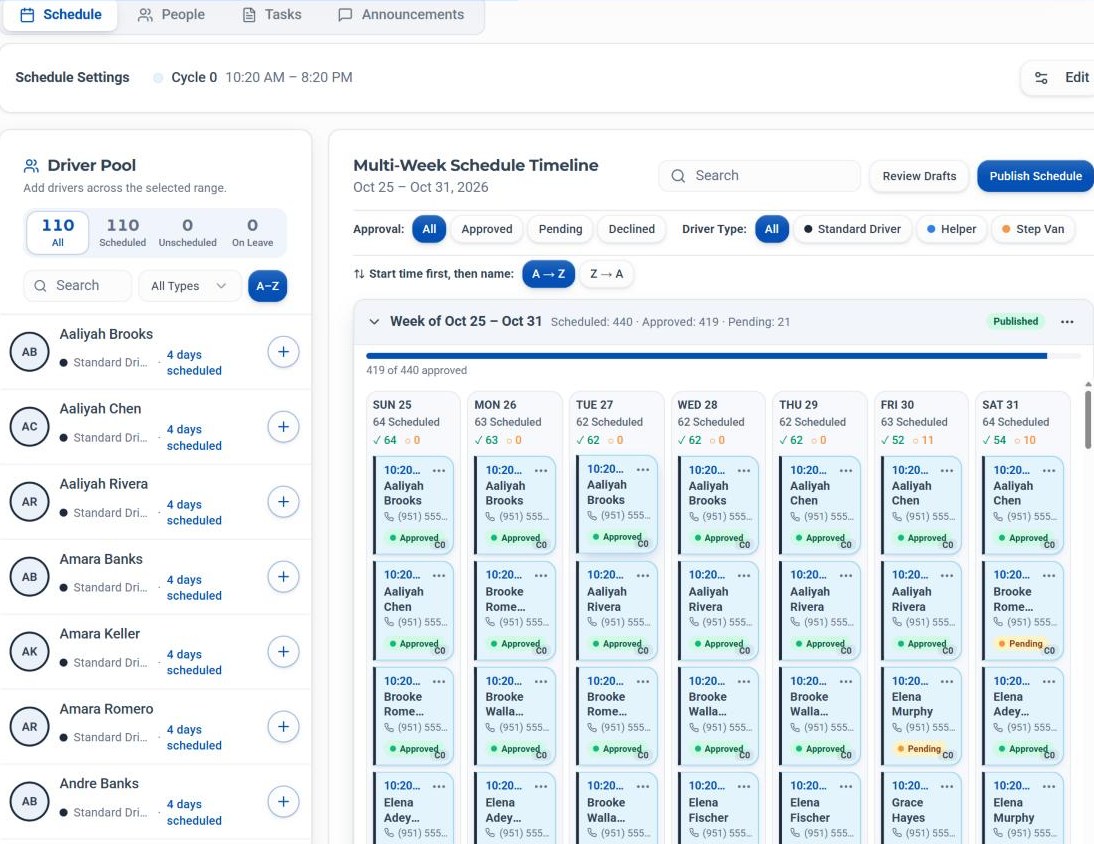
Lay out the week by driver and start time. FLO checks every shift as you place it, then sends the published week to drivers to accept or decline.
The problem
The schedule is where small mistakes become expensive.
A seventh straight day, a week that quietly runs past 40 hours, a driver who never saw the change. In a spreadsheet, no one notices until it's too late.
How FLO solves it
FLO builds the week around your shift cycles, blocks a seventh consecutive day, flags overtime as you go, and lets drivers answer every shift from their phone.
Inside Scheduling & Rostering
What it does, in detail.
Shift cycles
Cycle 0, Cycle 1, Cycle 2 and Flex, each with its own start time, end time and color, set in Schedule Settings.
Driver Pool
Find drivers and add them to the selected range. See who's scheduled, unscheduled or on leave at a glance.
Six-day limit
A seventh consecutive day is blocked, even across week boundaries. Six days in a row is the maximum.
Overtime checks
Hours past 40 in any rolling 7 days are flagged as overtime, resetting only after 2 days off, with a per-driver summary on the dashboard.
Review and publish
Check drafts with Review Drafts, then choose which weeks to publish.
Driver responses
Published shifts go to drivers to accept or decline. Filter the timeline by Approved, Pending or Declined.
How it works
Four steps, every time.
Set your cycles
Give each cycle its times and color in Schedule Settings.
Fill the week
Add drivers from the Driver Pool to the days and cycles you need.
Review drafts
Catch anything unpublished, out of bounds or over 40 hours.
Publish
Pick the weeks to send. Drivers accept or decline from their app.
The specifics
The details your team will ask about.
On the timeline
- Multi-week view, day by day
- Cards tinted by cycle color
- Sorted by start time, then cycle, then name
- Filters for approval and driver type (Standard, Helper, Step Van)
Around the schedule
- People list with a copy button for every email
- Tasks and Announcements sub-tabs
- Driver availability, set by dispatch
- Open runs drivers can bid on
Who it helps
Built for everyone at the station.
Operations Managers
A week that follows the rules before it ever goes out.
Dispatchers
Know exactly who has accepted tomorrow's shifts.
DSP Owners
Overtime caught at planning time, not on payday.
Drivers
Every shift on their phone, with a clear accept or decline.
- No. Schedules are built and published inside FLO.
- By week, Sunday to Saturday. Only the hours past 40 count as overtime, and shifts a driver declined are left out.
- FLO blocks it when you place the shift, and the streak carries across week boundaries.
- In the driver app: My Schedule shows published shifts grouped by week, and each new shift can be accepted or declined.
See Scheduling & Rostering with your own station.
Book a walkthrough with our team, or start a 30-day free trial and set it up yourself.
30-day free trial · Independent software, not affiliated with Amazon